 CopyGo
 The simple part
No setup. Really.
Most trading panels are software you install on a computer that has to stay switched on. This one isn't. Your broker account connects to CopyGo once, and after that the deck is just a web page you open.
Nothing to install
No EA to attach, no file to copy into a folder, no platform build to match. If you can open this page, you can open the deck.
No VPS, no PC left on
Your orders go through our engine, which is always running. Close your laptop and the account carries on exactly as it was.
Any device, any time
Phone on the train, tablet on the sofa, desktop at work. Same screen, same buttons, same account. Nothing to sync.
A guided tour
Five tabs. That's the whole thing.
Each one does a single job, and everything you need for that job is on it. Here is every tab, and what it is for — in plain words.
Open a trade at the size you want
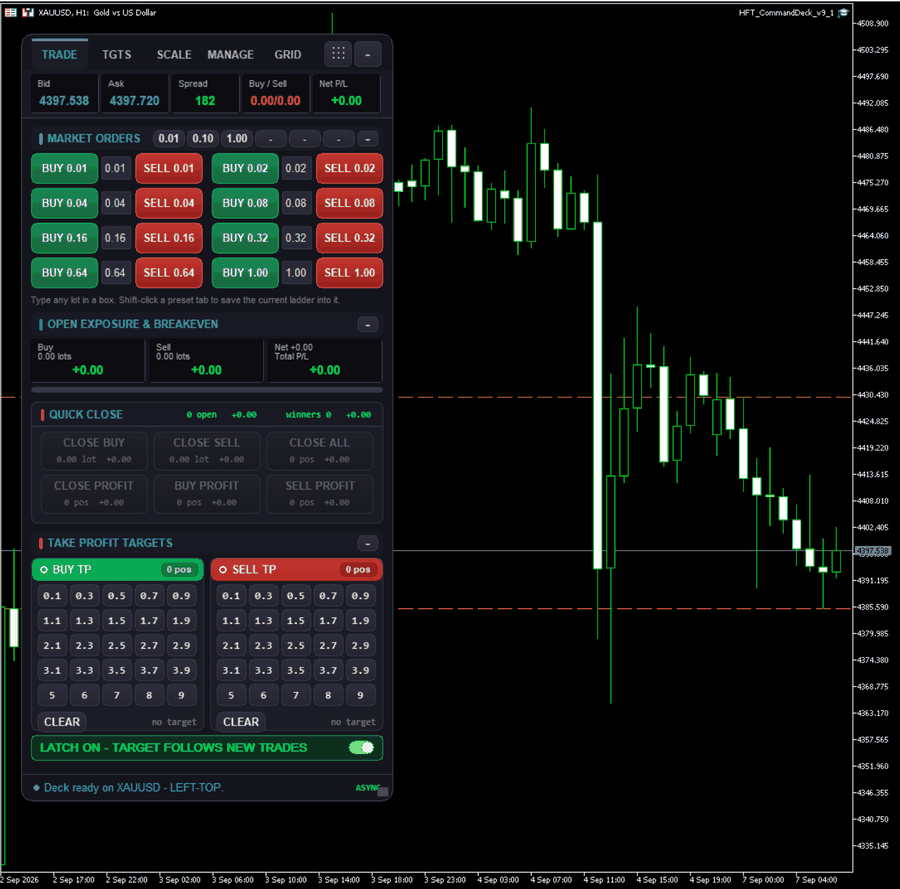
A ladder of lot sizes with a green Buy and a red Sell beside each one. You tap the size, not type it. The box in the middle is editable if you want a size that isn't there.
- Eight sizes down the ladder, buy and sell on every row
- Presets across the top switch the whole ladder at once
- Quick Close buttons sit right underneath — including close only the winners
- Buttons grey out when there is nothing to close, so you never guess
Set a take-profit without typing a price
You pick a distance, not a price. The deck works out the right price from where your trades actually sit, and puts the same target on all of them.
- Distances laid out as buttons — tap 1.5 and every buy gets a target 1.5 above break-even
- Buy and sell handled separately, so you can target one side only
- Latch: leave it armed and any trade you open afterwards gets the same target automatically
- Close the side and the latch switches itself off, so it can't surprise you tomorrow
Take some off the table, let the rest run
One tap closes a quarter, a half or three-quarters of a side and leaves the rest open. There is also a button that moves your stop to break-even, so the remainder is running risk-free.
- 25% / 50% / 75% part-close, applied across every trade on that side
- SL → BE moves the stop to your entry — only offered while the side is actually in profit
- Buy and sell are separate cards, so one side can be trimmed and the other left alone
Get flat, or freeze where you stand
The panic-button tab. Close everything, close one side, close just the winners — or hedge the whole book in one tap so the position stops moving while you decide what to do.
- One-click hedge opens the exact opposite size, freezing your profit or loss where it is
- Flatten closes every open trade and cancels every resting order on the symbol
- Your profit target, drawdown stop and auto-trail are shown here so you always know what is armed
- Confirmations tell you exactly what is about to happen, and how many trades it affects
Ladder into a move, with a hard size limit
Open one trade now and line up the rest to fill as price moves. You choose the gap, how many levels and how fast the size grows — and the deck shows you the total before you commit.
- Level 1 fills at market; the rest rest one gap apart from your own fill price
- The projected total is shown live as you type, and updates as you change any field
- A maximum total size you set yourself — go over it and the start buttons refuse
- The confirmation spells out the levels, the gap and the total before anything is placed
Right beside it
A chart that shows your trades
Not a generic price chart. This one draws your entries, your average price and your targets straight onto it, so you can see where you stand without reading a single number.
- Your entry marked on every open trade
- The break-even line — the price where the whole group is flat
- Take-profit and stop levels drawn where they actually are
- Timeframes and indicators to hand, and a refresh button when you want it now
Wherever you are
It fits the screen you have
The deck and the chart sit side by side on a desktop, and stack neatly on a phone so nothing is cut off. Drag the divider to give whichever one you're using more room.
Phone
Chart on top, controls underneath. Every button stays a comfortable size for a thumb.
Tablet
The full deck with the chart beside it. The most comfortable way to trade from the sofa.
Laptop & desktop
Drag the divider to widen the deck or the chart, and collapse any section you don't use.
On your own terminal
The same deck, as an EA
Prefer to run it yourself? The Command Deck also exists as an EA dashboard inside MetaTrader — identical controls, identical layout, sitting directly beside your broker connection. Available on request to selected clients.
Getting started
Three steps, once.
After this you just open the page.
Connect your broker
Enter your MT5 or cTrader login on the CopyGo Connect page. That is the only setup there is, and it takes about a minute.
Pick the account
Open the HFT Command Deck and choose the account from the dropdown at the top. Have several? Switch between them in one tap.
Trade
That's it. Your orders go straight to your broker through our engine, whether your computer is on or not.
⚠️ Worth knowing
Your orders travel from your browser to our engine and on to your broker — the same path every other CopyGo tool uses. What the deck gives you is every control in one place, on whatever device is to hand, without leaving a machine switched on. If you would rather run it beside your broker yourself, that is what the EA dashboard above is for.
Trading carries risk, and tools that make it quicker to open a position make it quicker to open a bad one. Please read our risk disclosures.
Included with the Trade Suite
Open it and see
Or free with any strategy subscription. The Trade Suite, account Mirror and the HFT Command Deck all come together — one price, no add-ons.
One subscription covers the Trade Suite, the HFT Command Deck, account Mirror and TradeControl — billed monthly in USDT, cancel any time.